10 ways AI is giving IT pros their time back: Highlights from DattoCon
BY IT GLUE | October 22, 2025
At DattoCon, Kaseya leaders and partners asked a powerful question: How can AI give you your life back? In “The operational revolution: AI strategies that give you your life back” session,Product Marketing Manager Maria Popa and Principal Solutions Engineer Natalie Mayo explored this topic. They discussed how AI can dramatically speed up IT service workflows, improve documentation quality and simplify everyday tasks for MSPs. All the features mentioned in this session are powered by Kaseya’s AI engine, Cooper Copilot, which brings intelligent automation across Autotask and IT Glue.
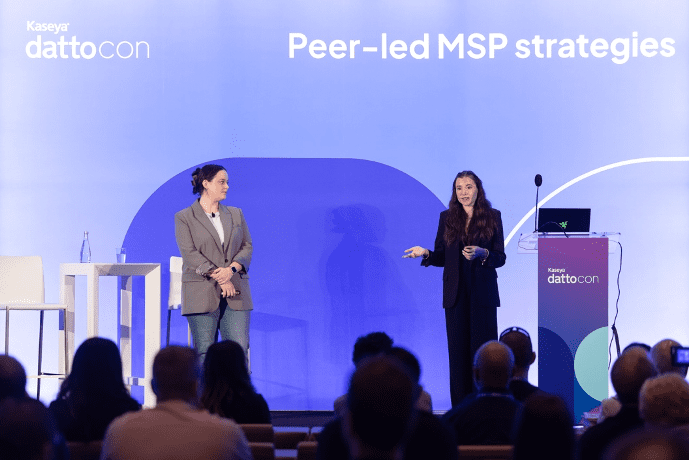
Product Marketing Manager Maria Popa and Principal Solutions Engineer Natalie Mayo give tips on how to leverage Kaseya’s top AI tools at Kaseya DattoCon 2025 in Miami Beach.
Here are ten takeaways from the session you can put into action right now.
1. Automate ticket triage so engineers can focus on solutions
Autotask’s Smart Ticket Triage uses AI to analyze ticket categories, SLAs, tags and historical data to automatically route and prioritize tickets. Mayo explained that manual triage (sorting, assigning and associating tickets) can consume hours every day. With AI, those steps are eliminated. “Optimization is no longer optional; speed is a necessity,” said Mayo. She recommended defining at least five clear ticket categories to make sure AI routing is accurate from the start.
2. Cut through the noise with ticket summaries
Smart Ticket Summaries in Autotask turn long, confusing email chains into concise digests that highlight only the key information. “Fast resolution doesn’t just mean closing tickets quickly. It means making sure your team always has the context they need,” said Mayo. These AI-generated summaries save technician time, improve collaboration and make handoffs smoother between teams.
3. Let documentation write itself with automated SOPs
With IT Glue’s Smart SOP Generator, you can record troubleshooting steps in real time across browsers and DataWire sessions, automatically producing SOPs while you work. Popa emphasized that maintaining clear, up-to-date documentation is a long-term investment that pays off in time savings and consistency. “Your future self will thank you for clean, connected documentation,” she added. Regular audits and smart tagging keep your knowledge base accurate and searchable.
4. Organize IT information intelligently
Smart Create in IT Glue consolidates critical IT data into flexible asset templates so technicians can view all related information (like users, devices, passwords or backups) in one organized place. Instead of digging through multiple records, teams get a clear, connected view of their IT environment, making it easier to identify issues, onboard new technicians and keep documentation accurate and up to date.
5. Connect the dots with smart asset relationships
Smart Relate in IT Glue automatically links related assets — users, devices, software and passwords — so you can see the bigger picture instantly. Linking SOPs to checklists and associating documents with user sessions streamlines onboarding, offboarding and troubleshooting.
6. Keep documentation lean and relevant
As MSPs grow, documentation can quickly become overwhelming. Popa described how Smart Assist in IT Glue helps identify unused, outdated or duplicated content so teams can bulk-archive or delete unnecessary documents. Keeping your documentation lean and current ensures technicians can find what they need without wading through clutter. Popa reminded attendees to maintain a balance between automation and human review, stating that “AI helps surface what’s outdated, but a human still decides what’s worth keeping.”
7. Turn messy notes into professional communication
Autotask’s Smart Writing Assistant transforms shorthand or jargon-filled updates into polished, plain-language summaries fit for reports, invoices or client emails. Mayo explained that this tool helps teams translate technical language into client-ready communication, which is essential for maintaining professionalism and trust. “It can turn bullet-point gibberish into something a CFO can read,” she said.
8. Monitor your environment at a glance with AI summaries
Popa discussed how Integrated Executive Summaries in myITprocess can provide quick, AI-driven overviews across service areas like backup health, software tracking and wireless network data. These summaries give technicians a single-pane view of critical information, helping them identify failed backups, outdated software versions or network issues instantly. This allows IT teams to spot risks proactively instead of reactively.
9. Drive adoption through coaching, not mandates
Popa cautioned that while standardization helps maintain consistency, not every client environment is identical. MSPs should use automation to standardize what makes sense, like onboarding procedures or backup verification, while allowing flexibility for specialized client needs. “It’s all about balance,” she noted, “so your processes stay practical and adaptable.”
10. Keep the human element in your AI strategy
Both Popa and Mayo emphasized that AI should enhance, not replace, technician expertise. Automation speeds up repetitive work, but human insight ensures accuracy, empathy and quality decision-making. Regular audits and reviews let teams verify that AI-generated outputs align with business goals and client expectations.
Want help implementing these tips?
If you’re ready to put these strategies into practice, here are a few ways to start today:
- Audit your documentation and enable Cooper Copilot in IT Glue to remove outdated content and surface the assets your team actually uses.
- Standardize your ticket categories and activate Smart Ticket Triage in Autotask to eliminate manual routing.
- Empower your technicians with hands-on training. Show them how AI tools can make their daily work smoother and less repetitive.
Book an IT Glue demo with a specialist to see these AI-driven capabilities in action and learn how they can transform your service delivery.