Elevate every QBR: myITprocess updates that make reporting faster and more professional
BY IT GLUE | December 18, 2025
As MSPs step up how they communicate with clients, quarterly business reviews (QBRs) have shifted from routine check-ins to key moments to show progress, build trust and explain the real value of your services. But creating a clear, consistent and polished report often means juggling information across multiple tools and formats, which is why we’ve introduced new updates across the myITprocess QBR report builder and integrated executive summary to streamline how you build and present QBRs and make every client conversation feel more aligned, data rich and professional.
These updates are designed for one goal: to help you create consistent, credible and beautifully branded reports with less effort and more impact.
Import PDFs to centralize all your client information
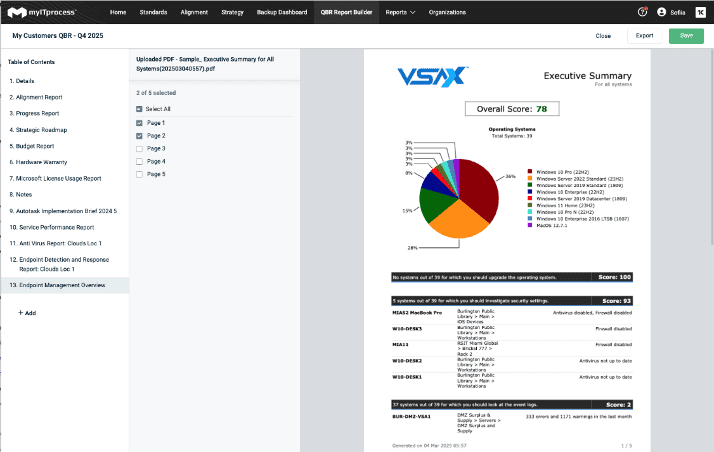
You no longer need to hunt through multiple tools or glue together external documents. With the new PDF import capability, you can pull in information from any other system — whether myITprocess integrates with it or not.
Have reports from a firewall, compliance tool or security test vendor? Pull them in with one click. Everything now lives inside the QBR builder, so you spend less time compiling and more time telling a cohesive, data-driven story.
Learn more at our knowledge base article.
Bring in details from any other tool
QBRs often require insights from a variety of sources. Now, you can add supporting details like screenshots, charts, findings and summaries from any tool directly into the report. No switching tabs, exporting or manual formatting needed.
This update empowers IT teams to create a single, unified client narrative, even when their tool stack extends beyond IT Glue’s direct integrations.
Cover page customization: Your brand, front and center
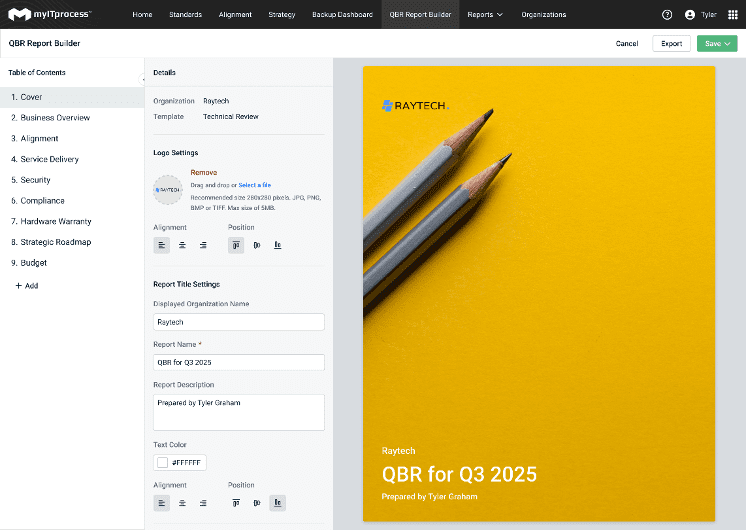
In many cases, the cover page is the only part of the report a decision-maker actually sees, so it needs to look intentional and on-brand. With the redesigned cover page options in the QBR report builder, you can shape that first impression to match how you want your business to show up in front of clients.
You can fine-tune details like:
- Uploading your own hero image
- Choosing text color and alignment
- Adding your organization’s name, logo and descriptive subtitles
- Arranging elements to match your existing brand guidelines
The result is a report that feels polished, personalized and clearly tied to your brand, reinforcing your position as a strategic partner rather than just a behind-the-scenes IT provider.
Learn more at our knowledge base article.
Integrated Executive Summary: Consistent data for clearer client conversations
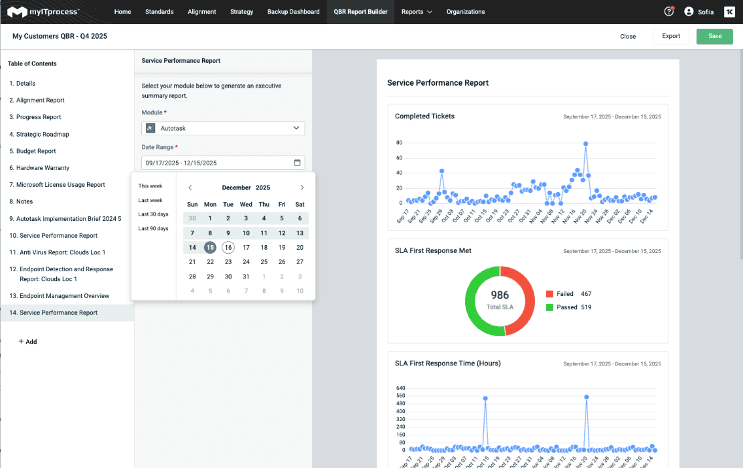
Timing is a big part of telling a clear story in QBRs. In the past, the Integrated Executive Summary used module-specific default timelines, so you might end up reviewing tickets from the last 30 days, risk items from the last quarter and projects on yet another timeline.
With this update, you can choose a single date range for the entire summary — whether that’s 30 days, 90 days, six months, a year or any custom window that fits the way your client likes to review progress.
That change does a few important things for your QBRs:
- Every module in the summary now displays data from the same timeframe
- Reports become easier for clients to scan, compare and understand
- You can align the view to any cadence — monthly, quarterly or annually
When everything is anchored to the same period, conversations feel more focused and it’s much easier to show how your work is moving the needle over time.
Add Datto SaaS Protection to your backup reporting
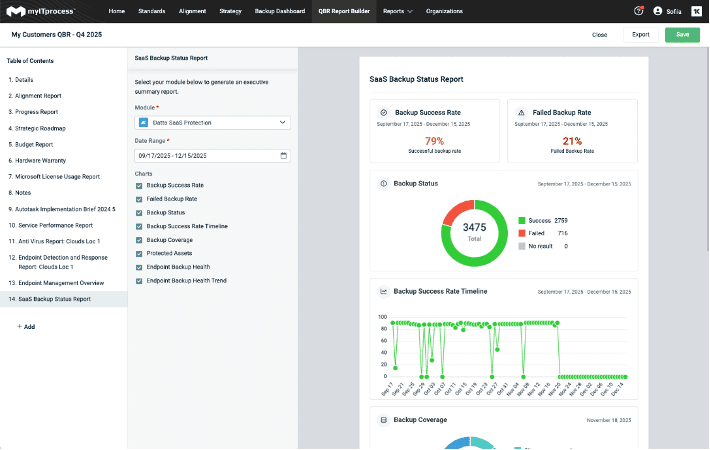
You already rely on the Integrated Executive Summary to showcase endpoint and device backup performance through Datto BCDR. Now, with the addition of Datto SaaS Protection, you can extend that story to include user-level backup performance and give clients a clearer picture of how well their cloud applications are protected.
This means you can:
- Show clients their SaaS data is protected
- Highlight successful backup completion
- Demonstrate you’re meeting agreed-upon SLAs
- Strengthen your value as a trusted security partner
This upgrade brings even more transparency to your backup posture reporting across both devices and users.
Learn more at our knowledge base article.
Deliver higher-value QBRs with less effort
Every enhancement in this release is built around what IT teams need today: speed, clarity, brand presence and alignment across tools and data.
By expanding what you can import, customize and display inside the QBR Report Builder and Integrated Executive Summary, IT Glue continues to simplify complex reporting and help you shine in every strategic conversation. If you’re ready to deliver QBRs that clients immediately understand, trust and appreciate, these new updates are already at your fingertips.
Want to see how these updates come together in a real QBR? Book a myITprocess demo with a product expert and take a closer look.